
Sometimes you don’t need the most accurate OCR in the world. You need OCR that’s good, cheap, and fast enough to run on every document, every time, without thinking about the bill.
Think of lite as System One OCR: fast and intuitive. Our balanced and accurate modes are System Two, for when every character matters.
Today we’re launching lite mode in the Datalab API, for $0.50 per 1,000 pages. It returns full document structure: text, tables, headings, lists, reading order, and a layout box for every block.
At that price, OCR stops being a batch job you budget for, and becomes something you put directly into your product. Parse every upload while the user waits. Index every page of an archive instead of a sample. Re-run a whole corpus when your pipeline changes. Jevons was right: when OCR gets 10x cheaper, you don’t just save money on the documents you already process. You start processing documents you used to skip.
Lite runs a version of Indra OCR, our 1M-parameter OCR model, on CPU. That’s what makes it cheap.
- 10x cheaper than Azure Layout. Outside of math, lite scores higher than Azure Layout on text, matches it on layout, and it’s far ahead on non-Latin scripts.
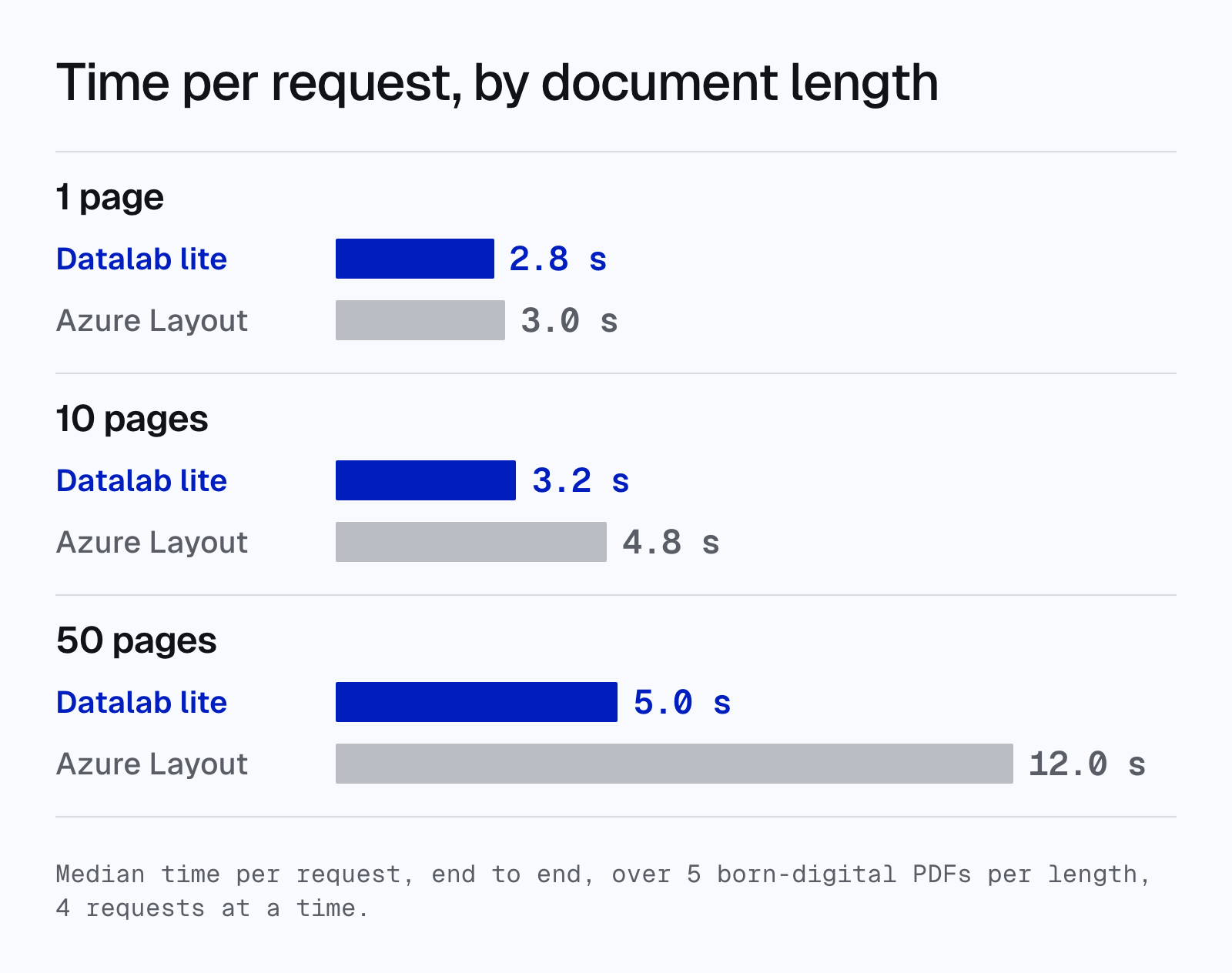
- 2x faster than Azure Layout on long documents. A 50-page PDF comes back in 5.0 seconds, against 12.0 seconds for Azure Layout.
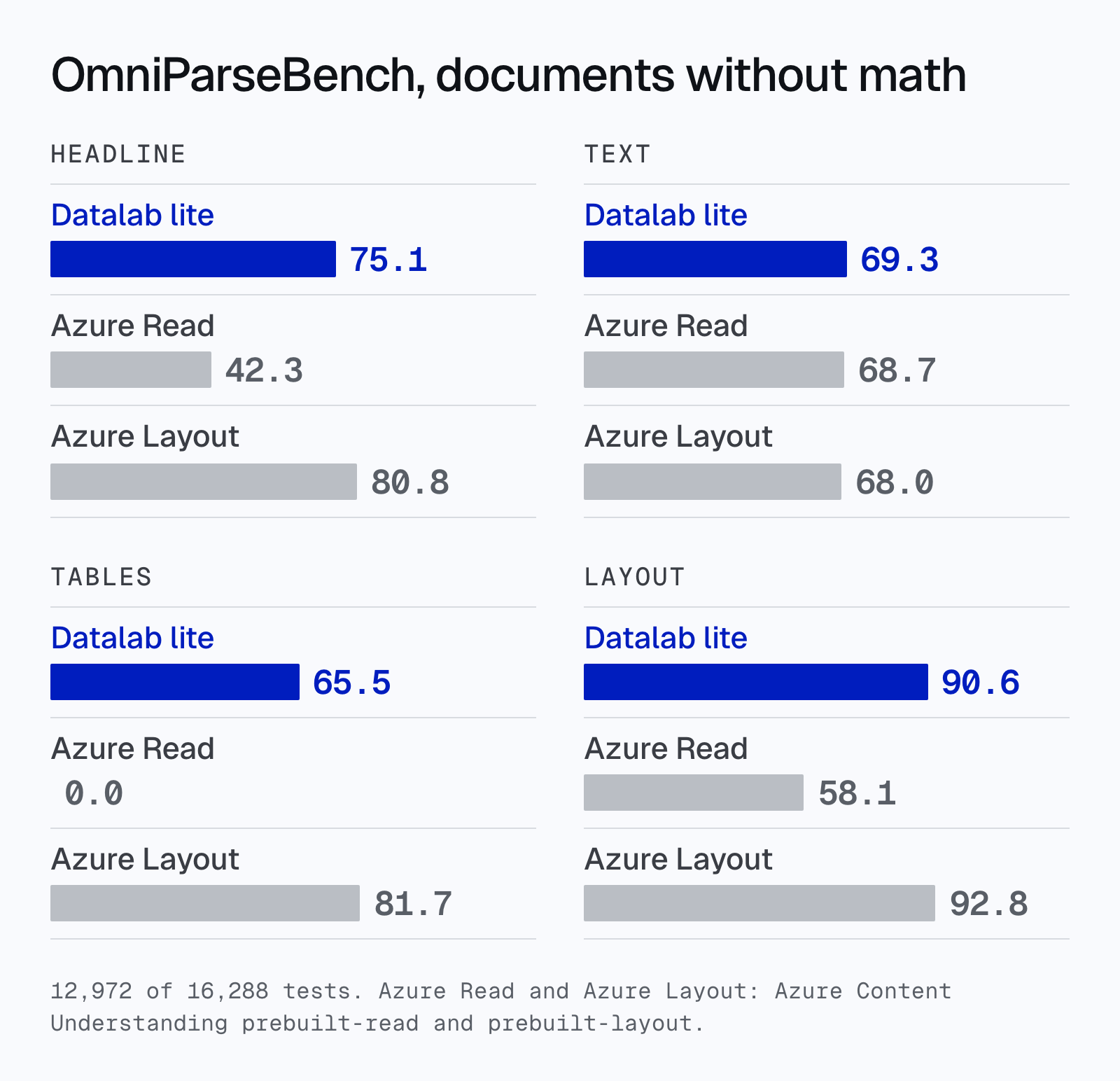
- More accurate than Azure Read, at half the price. On OmniParseBench documents without math, lite scores 75.1 and Azure Read scores 42.3. Read returns text only, with no tables or layout.
Price
Lite is $0.50 per 1,000 pages, with no tiers and no minimums. A million pages costs $500. The same million pages costs $5,000 with Azure Layout, $10,000 with Google’s Layout Parser and $15,000 with AWS Textract’s layout and tables. That’s 2x to 3x cheaper than the text-only OCR services from Azure, AWS and Google, and 10x to 30x cheaper than their layout services:
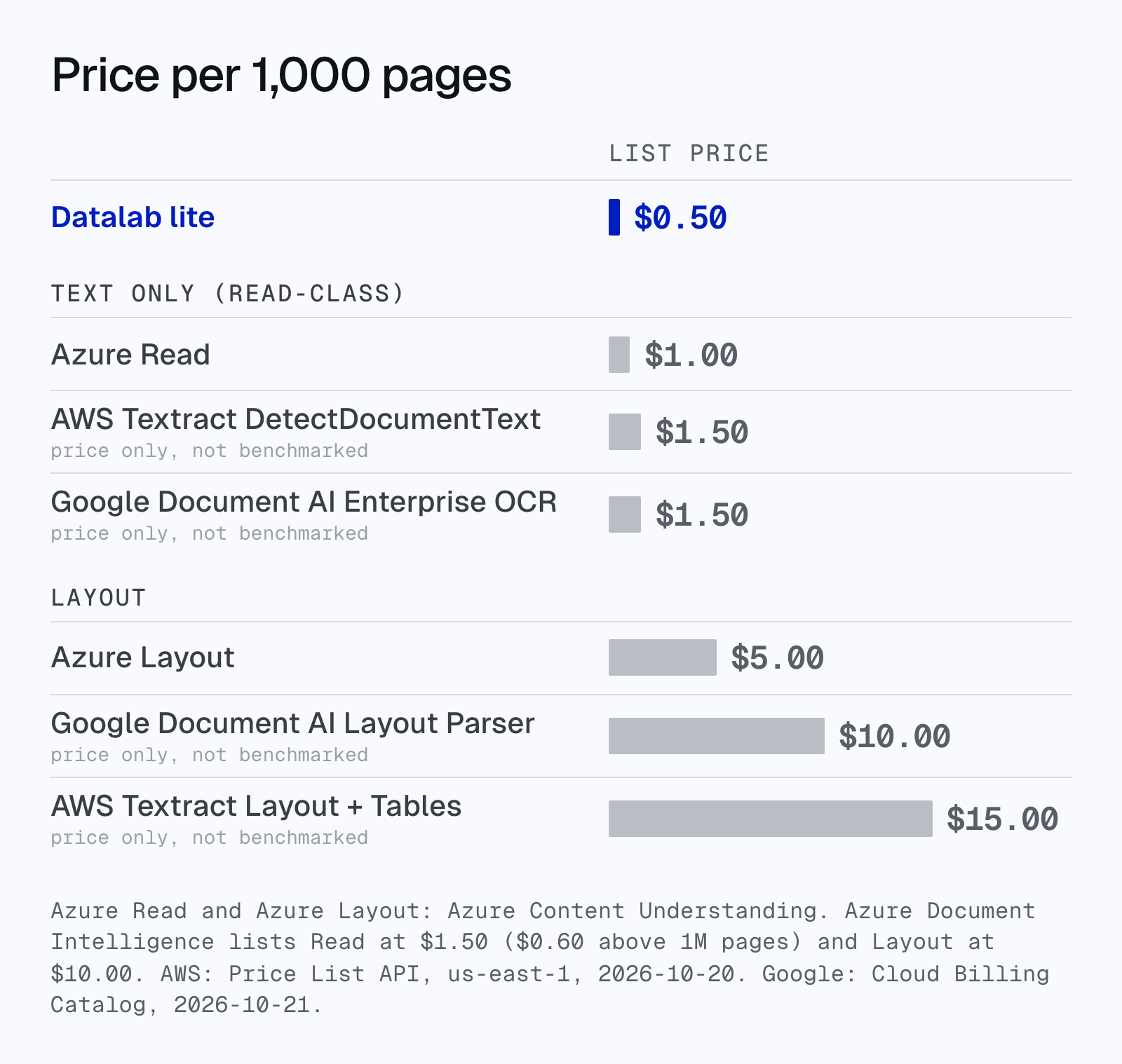
Azure: Content Understanding list prices. AWS Textract: AWS Price List API, us-east-1, October 20, 2026 (DetectDocumentText $1.50; AnalyzeDocument Layout + Tables $15.00). Google Document AI: Cloud Billing Catalog, October 21, 2026 (Enterprise Document OCR $1.50; Layout Parser $10.00).
Speed
On a single page, lite is on par with Azure. Using the OmniParseBench latency method (200 pages, 8 requests at a time), lite’s median is 3.3 seconds per page, and Azure’s is 2.4 to 3.7 seconds depending on where you call it from.
On longer documents, lite pulls ahead. Each request has about 2.5 seconds of fixed cost, and after that lite adds about 0.05 seconds per page, against about 0.19 for Azure Layout:
Accuracy
We ran lite on all 2,937 pages of OmniParseBench, with the benchmark’s own harness and scorer, through the API. Lite doesn’t write equations as LaTeX, so for documents without math (12,972 of the 16,288 tests), here’s how it compares:
| Parser | Price / 1,000 pages | Headline | Text | Tables | Layout |
|---|---|---|---|---|---|
| Datalab lite | $0.50 | 75.1 | 69.3 | 65.5 | 90.6 |
| Azure Read | $1.00 | 42.3 | 68.7 | 0.0 | 58.1 |
| Azure Layout | $5.00 | 80.8 | 68.0 | 81.7 | 92.8 |
Lite scores higher than both Azure products on text, and matches Azure Layout on layout, at a tenth of Layout’s price. The remaining gap to Azure Layout is complex tables.
On the full benchmark, math included:
| Parser | Price / 1,000 pages | Headline | Text | Tables | Layout |
|---|---|---|---|---|---|
| Datalab lite | $0.50 | 68.1 | 48.1 | 65.5 | 90.8 |
| Azure Read | $1.00 | 44.5 | 75.0 | 0.0 | 58.6 |
| Azure Layout | $5.00 | 83.0 | 74.6 | 81.7 | 92.8 |
Azure Read and Azure Layout are Azure Content Understanding’s prebuilt-read and prebuilt-layout analyzers, at Azure’s list prices. Azure Document Intelligence lists Read at $1.50 ($0.60 above 1M pages) and Layout at $10.00. Azure Layout’s scores are the leaderboard’s. Azure Read is our run on the same harness. “Without math” leaves out every test tagged math.
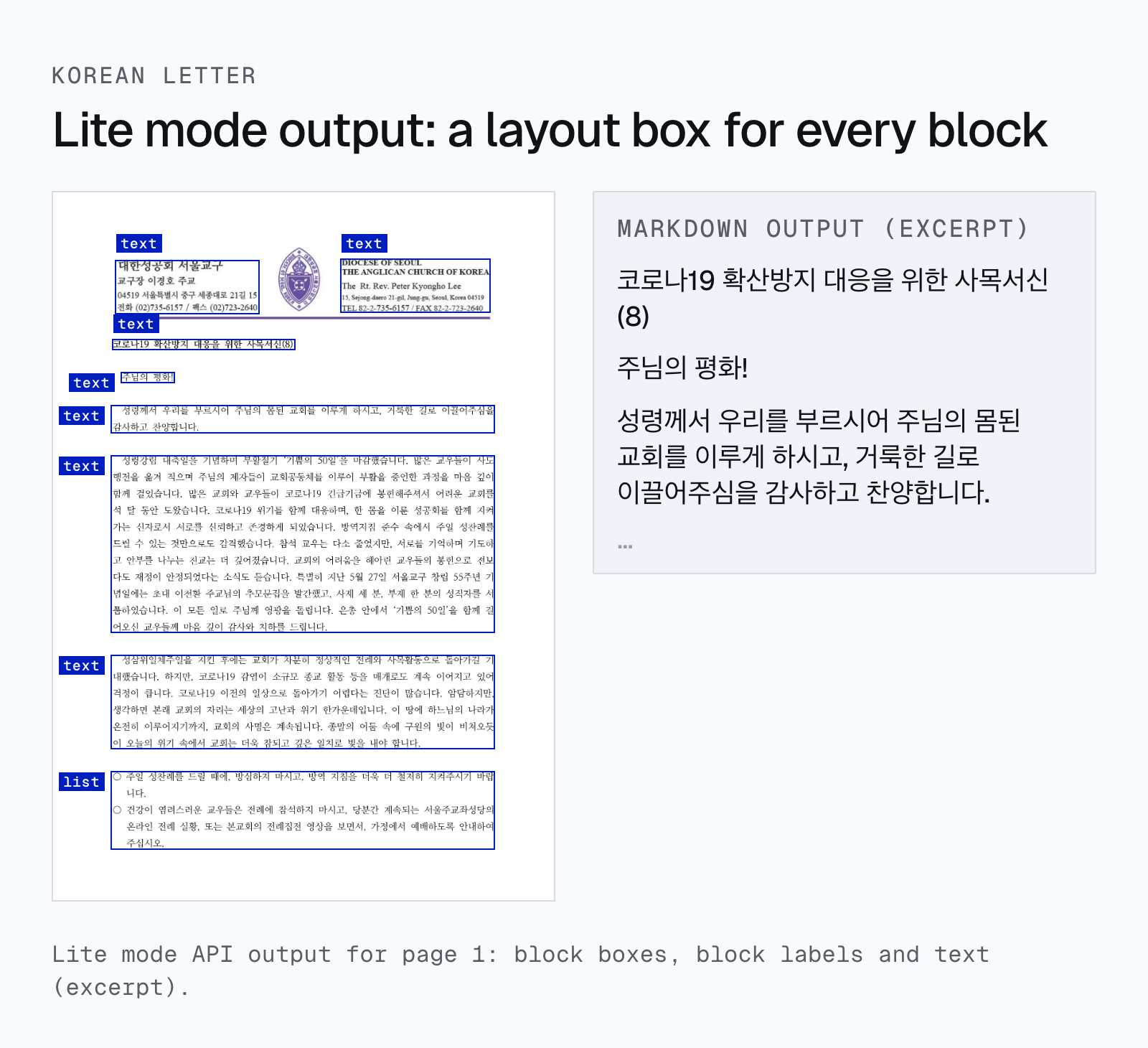
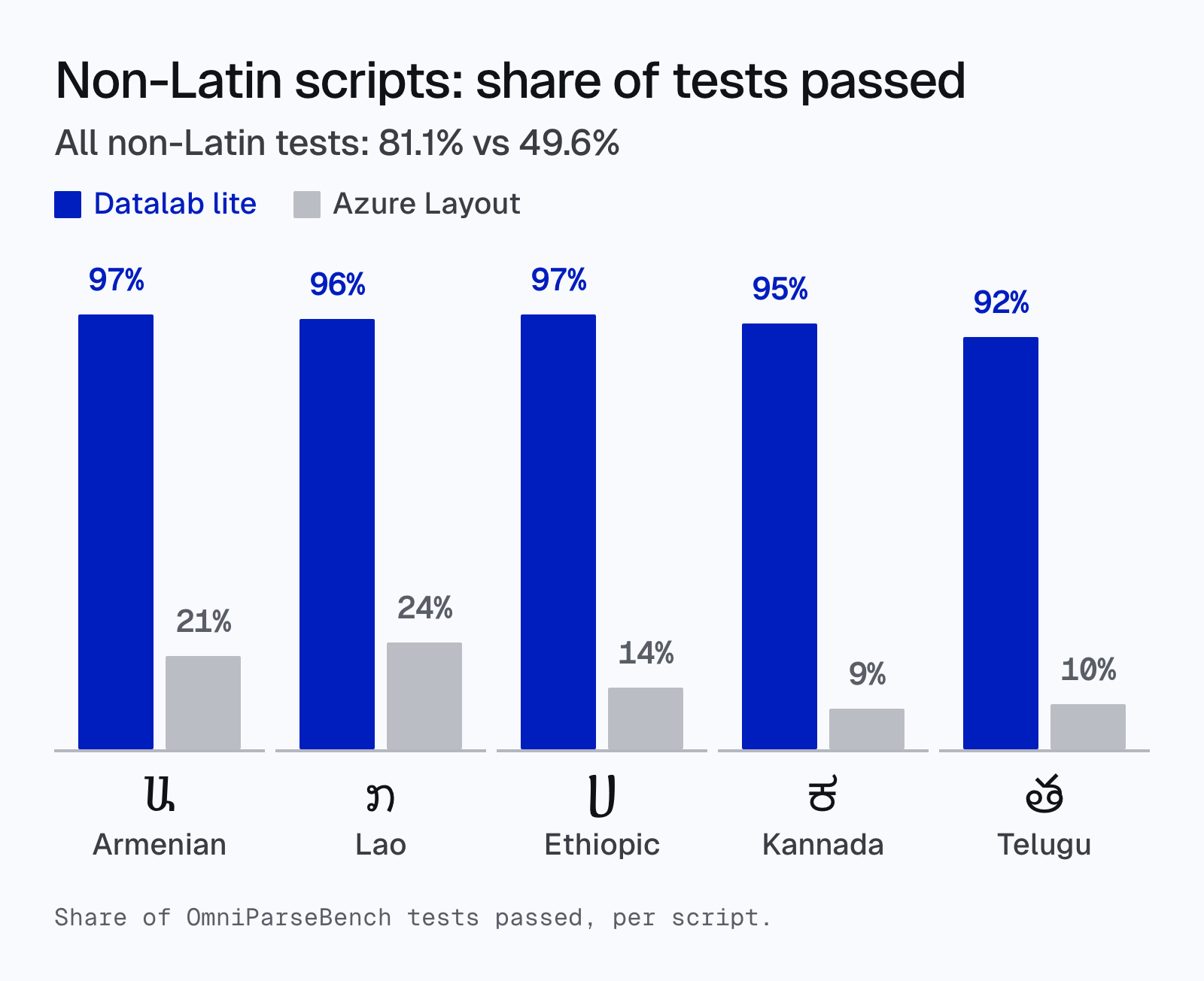
Where lite pulls ahead is scripts. On tests in non-Latin scripts, lite passes 81.1% and Azure Layout passes 49.6%. For example:
When to use lite
Lite is built for high volume: archives, search indexing, RAG ingestion, and any pipeline where you process millions of pages and need structure, not just text.
It’s not the right choice for every document:
- Math: equations come back as plain text, not LaTeX.
- Complex tables: lite reads the cell text, but tables with merged cells or multi-level headers can lose structure.
- Handwriting, rotated and degraded scans: these read, but less accurately than our other modes.
- No images or captions: lite doesn’t extract figures.
For these, use fast, balanced or accurate mode, which run Chandra.
Try it
Set mode to lite:
import time
import requests

API_KEY = "YOUR_API_KEY"
headers = {"X-Api-Key": API_KEY}

resp = requests.post(
    "https://www.datalab.to/api/v1/convert",
    headers=headers,
    files={"file": open("document.pdf", "rb")},
    data={"mode": "lite", "output_format": "markdown"},
).json()

while True:
    result = requests.get(resp["request_check_url"], headers=headers).json()
    if result["status"] == "complete":
        break
    time.sleep(1)

print(result["markdown"])
Lite is live now in the API. If you have a high-volume workload, tell us about it.