
Last year we shipped track changes for Word documents: send a DOCX with revisions in it, get back Markdown and HTML with every insertion, deletion, and comment tagged inline. It worked well, with one hard limit. It only worked on DOCX, because it read the revision markup straight out of the document XML.
Most redlines don’t arrive as DOCX. Counterparties send PDFs so the other side can’t edit them. Legislatures publish amended bills as PDFs with strikethrough and underline. Courts file redlined orders. Reviewers print a draft, mark it up, and scan it back. In all of these, the tracked changes exist only as ink on a page.
Today we’re extending track changes to PDFs and scanned images. The same /track-changes endpoint now accepts a PDF or an image and returns the same inline <ins>, <del>, and <comment> markup, read off the page by a new model we trained for exactly this.
What the model does
A redlined page has no structure a parser can extract. It has visual conventions: underlined or colored text for insertions, strikethrough for deletions, bracketed text, “Inserted:” and “Deleted:” balloons in the margin, comment bubbles with a note and sometimes an initial. Every editor and every legislature draws these slightly differently.
We trained a vision model on top of our Surya OCR family to read those conventions. It takes a rendered page and produces layout-aware HTML, exactly like our normal OCR, with three additions:
- Inserted text is wrapped in
<ins>. - Deleted text is wrapped in
<del>, whether it’s struck through, bracketed, or called out in a margin balloon. - Margin comments become
<comment text="...">around the span they’re attached to, with the note body in thetextattribute.
A page with no visible markup comes back as a plain parse, so you can run the whole document through it without deciding page by page which ones are redlined.
Here’s real output from a redlined PDF of the Illinois Shines distributed generation contract requirements, a public regulatory document revised year over year with the changes shown in red underline and strikethrough. Download it and run it through the endpoint to get the same result. The revision bumped the publication and compliance dates and added a note at the top:
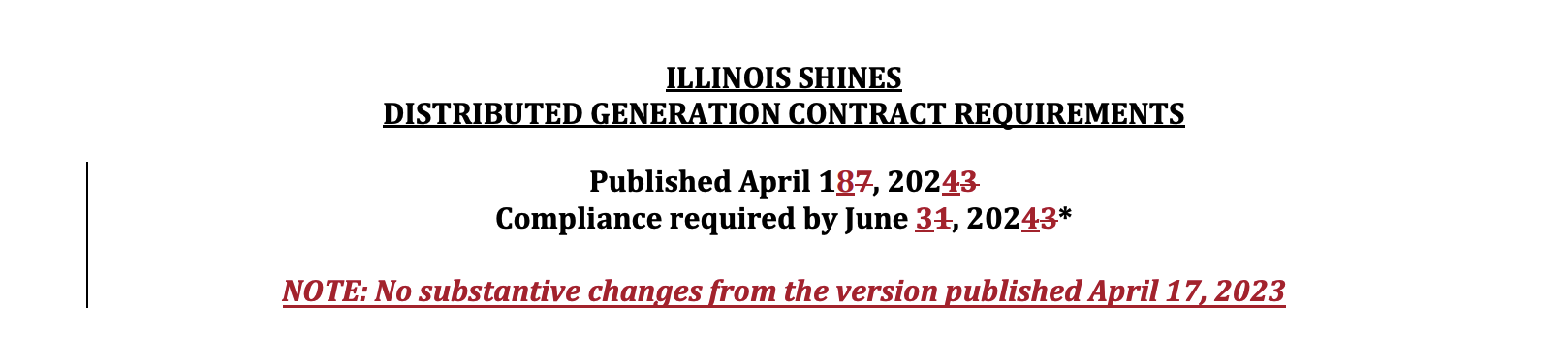
This is the Markdown the endpoint returns for that header:
**ILLINOIS SHINES**
**DISTRIBUTED GENERATION CONTRACT REQUIREMENTS**

**Published April 1<ins>8</ins><del>7</del>, 202<ins>4</ins><del>3</del>**
**Compliance required by June <ins>3</ins><del>1</del>, 202<ins>4</ins><del>3</del>***

**<ins>NOTE: No substantive changes from the version published April 17, 2023</ins>**
Note the granularity. The editor changed single digits inside a date, and the model tags exactly those digits rather than the whole line. Further down, a term was swapped inside a bullet, and the HTML output keeps it in place within the list:
<li>
  Whether <del>PPA offtaker</del><ins>the customer</ins> has right to purchase the system
  <ul>
    <li>before end of lease term; or</li>
    <li>upon end of lease term</li>
    <li>In either case, economic terms for purchase</li>
  </ul>
</li>
The tags survive into every output format. HTML and chunks keep them as-is. Markdown normally has no way to express an insertion or a comment, so in track-changes mode the Markdown output keeps these three tags as literal inline HTML rather than flattening them.
Text inside figures is transcribed verbatim rather than captioned, since in a redline the figure is often a table or a diagram whose contents are what changed.
DOCX and PDF, one endpoint
Nothing changes for Word documents. A DOCX is still read exactly from its revision XML, which is the only way to get the author and timestamp on every change. That metadata isn’t printed on a page, so the PDF path can’t recover it. What the PDF path recovers is what a reviewer sees: which text was added, which was removed, and what the comments say.
The endpoint picks the path from the file type. Send a DOCX and you get exact extraction. Send a PDF, a PNG, a TIFF, or any other document format we accept, and it’s rendered and read by the model. Scans are handled the same way as digital PDFs, since the model only ever sees pixels.
Using it
Set extras=track_changes on the parse endpoint, or call /track-changes directly. Output formats are markdown, html, and chunks. page_range, max_pages, paginate, webhook_url, and processing_location work as they do elsewhere.
import os, time, requests

headers = {"X-Api-Key": os.environ["DATALAB_API_KEY"]}

resp = requests.post(
    "https://www.datalab.to/api/v1/track-changes",
    headers=headers,
    files={"file": open("amended_bill.pdf", "rb")},
    data={"output_format": "html,markdown"},
).json()

while True:
    result = requests.get(resp["request_check_url"], headers=headers).json()
    if result["status"] == "complete":
        break
    time.sleep(3)

print(result["html"])
The marked-up output is a good input for a model. Because the changes are tagged rather than described, you can ask for a summary of what changed, or diff two redline rounds, without the model having to first work out what a strikethrough means:
prompt = f"""Below is a document with tracked changes marked as <ins>, <del>,
and <comment> tags. List every substantive change, note which party it
favors, and flag any comment that asks for a follow-up.

{result["markdown"]}"""
You can also pull the changes out programmatically, since the tags are ordinary HTML:
from bs4 import BeautifulSoup

soup = BeautifulSoup(result["html"], "html.parser")
insertions = [tag.get_text(" ", strip=True) for tag in soup.find_all("ins")]
deletions = [tag.get_text(" ", strip=True) for tag in soup.find_all("del")]
comments = [(tag["text"], tag.get_text(" ", strip=True)) for tag in soup.find_all("comment")]
It’s also on in the playground. Turn on the Track Changes card and drop in a PDF or an image.
Where it fits
- Contract negotiation. The other side sends a redlined PDF. Extract the changes, summarize them, and route the ones that shift risk or obligations to a reviewer.
- Legislative and regulatory tracking. Amended bills and rule changes are published as PDF redlines. Turn each one into a structured list of what was added and removed, at scale, across a whole session.
- Court filings. Redlined proposed orders and amended pleadings, straight from the docket.
- Scanned markups. A printed draft, marked up by hand or in a PDF editor, and scanned back. The model reads it the same way it reads a digital PDF.
- Version reconciliation. When you have a redline PDF and need the clean text of both versions, accept the insertions and drop the deletions for the new version, or the reverse for the old one.
Pricing and availability
Track changes on PDFs and images is billed at the same rate as the existing DOCX feature, $6 per 1,000 pages on top of conversion, and it’s available on every plan. It runs in both our US and EU regions, so processing_location=eu keeps page images in region.
It’s also available in our on-prem container for teams that can’t send documents out. Contact us if you need that.
If you have a corpus of redlines that trips it up, or a convention we haven’t seen, email [email protected]. Real documents are how the model got here, and they’re how it gets better.