
We’ve rebuilt segmentation as an agent. Instead of a single pass over the pages, a model reads through the packet, checks the places where one document seems to end and another begin, and only then commits to an answer. It works on scans and digital PDFs alike, and on packets of any length, from a few pages to well over a thousand.
Benchmark results
PoliTax-Split is a public benchmark of long tax filings, split by a specific convention, so it tests reading and instruction-following at once. We gave our agent that convention as a prompt and scored it on strict document F1.
The benchmark was fully held out: we never trained or tuned on it, or on similar documents.
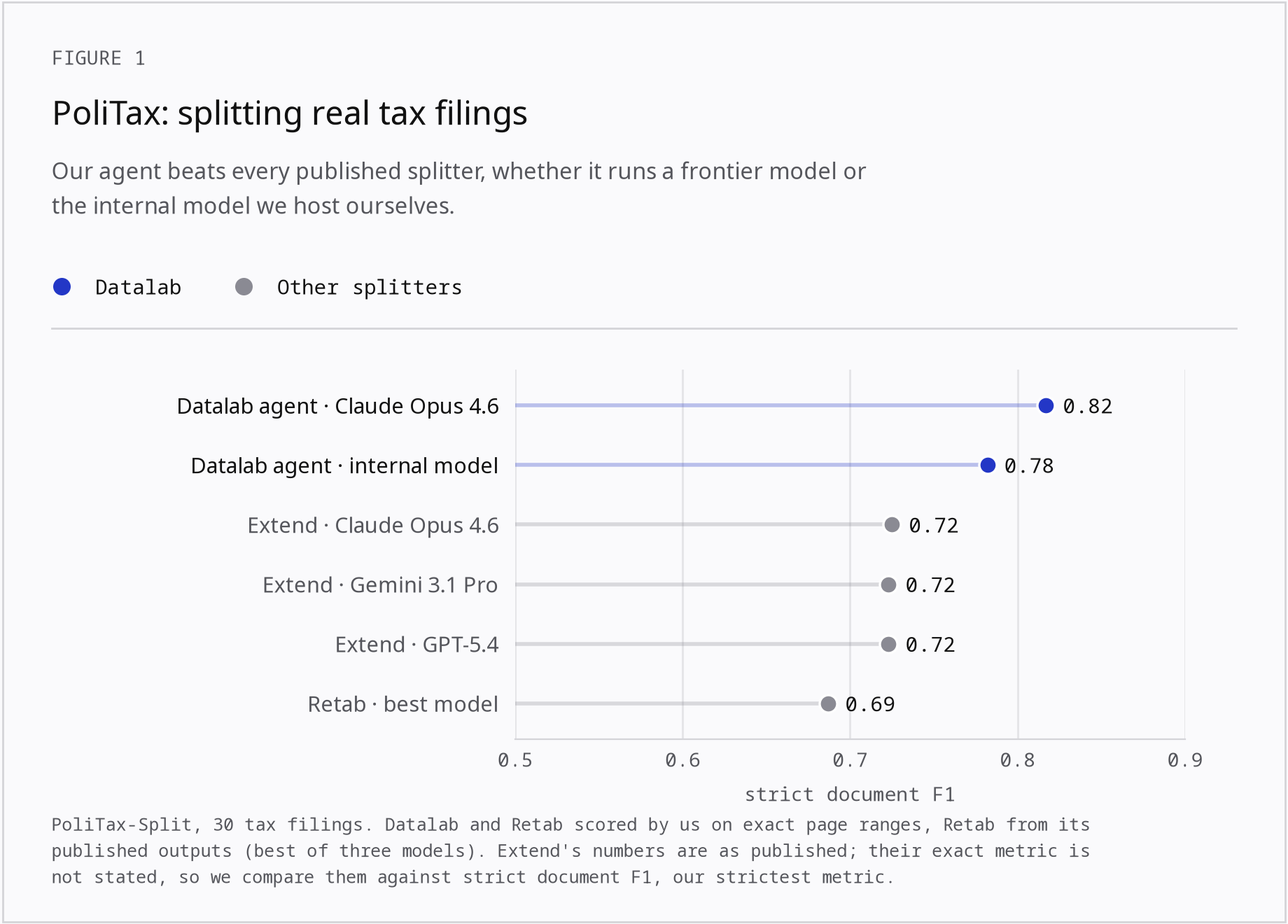
Our agent leads with either model behind it. With Claude Opus 4.6 it reaches 0.82, and with our internal model, 0.78. The best published results are Extend’s at 0.72 and Retab’s at 0.69. The lead holds on the soft metric too (0.79 and 0.77 against Retab’s 0.68).
A note on the comparison: we scored Retab ourselves from the outputs they published, using the same metric as for our runs. Extend’s numbers are taken from their published results. They don’t state exactly which metric they use, so we compare them against our strictest metric, strict document F1.
On our internal benchmark of 160 packets, which mixes digital and scanned documents, the production agent scores 0.95–0.97 strict document F1, and it holds at about 0.96 on packets of over 1,000 pages.
How we measure: strict document F1
The easy way to score a split is page-level accuracy, but it makes splitters look better than they are. Most pages are continuation pages, so a splitter can score high while getting the boundaries, the only hard part, wrong.
We score whole documents instead. A predicted document counts only if its page range exactly matches a real one, and document F1 balances precision against recall over those documents. This is what matters downstream: a document off by one page means extraction runs on the wrong pages.
Drag a boundary in your split to move it. Click inside a document to split it at that page, or on its first page to merge it back.
- Page accuracy
- 93% pages in the right document
- Soft document F1
- 0.75 3 of 4 predicted documents overlap a true one by 80%+
- Strict document F1
- 0.50 2 of 4 predicted documents have exactly the right pages
We also track a soft version, where a document counts if it overlaps its true page range by at least 80% (shared pages over all pages in either). It’s useful for telling near-misses from real failures, but strict document F1 is our headline number.
What counts as a document is up to you
There’s no single right way to split a packet. A tax preparer may want each IRS form and schedule as its own document, while an archive may want one document per return.
So you set the definition. Pass a plain-language prompt with the file:
schema = {
    "segmentation_strategy": "document_boundary",
    "granularity": "page",
    "prompt": "Each IRS form, schedule and supporting statement is its own document.",
}
Without a prompt, the agent splits on the usual signals: new titles, letterheads, restarted page numbers, a change of sender or subject.
Training small models to split
The production agent runs on our internal model. To make segmentation faster and cheaper, we’ve also been training two smaller models, a small and a medium one, with the same recipe as in our looping post: on-policy distillation from the internal model and/or reinforcement learning inside the same agent loop.
On packets like the ones they trained on, both get close to the internal model. On real FDA packets, outside that distribution, the medium model keeps most of its gain and the small model well under half.
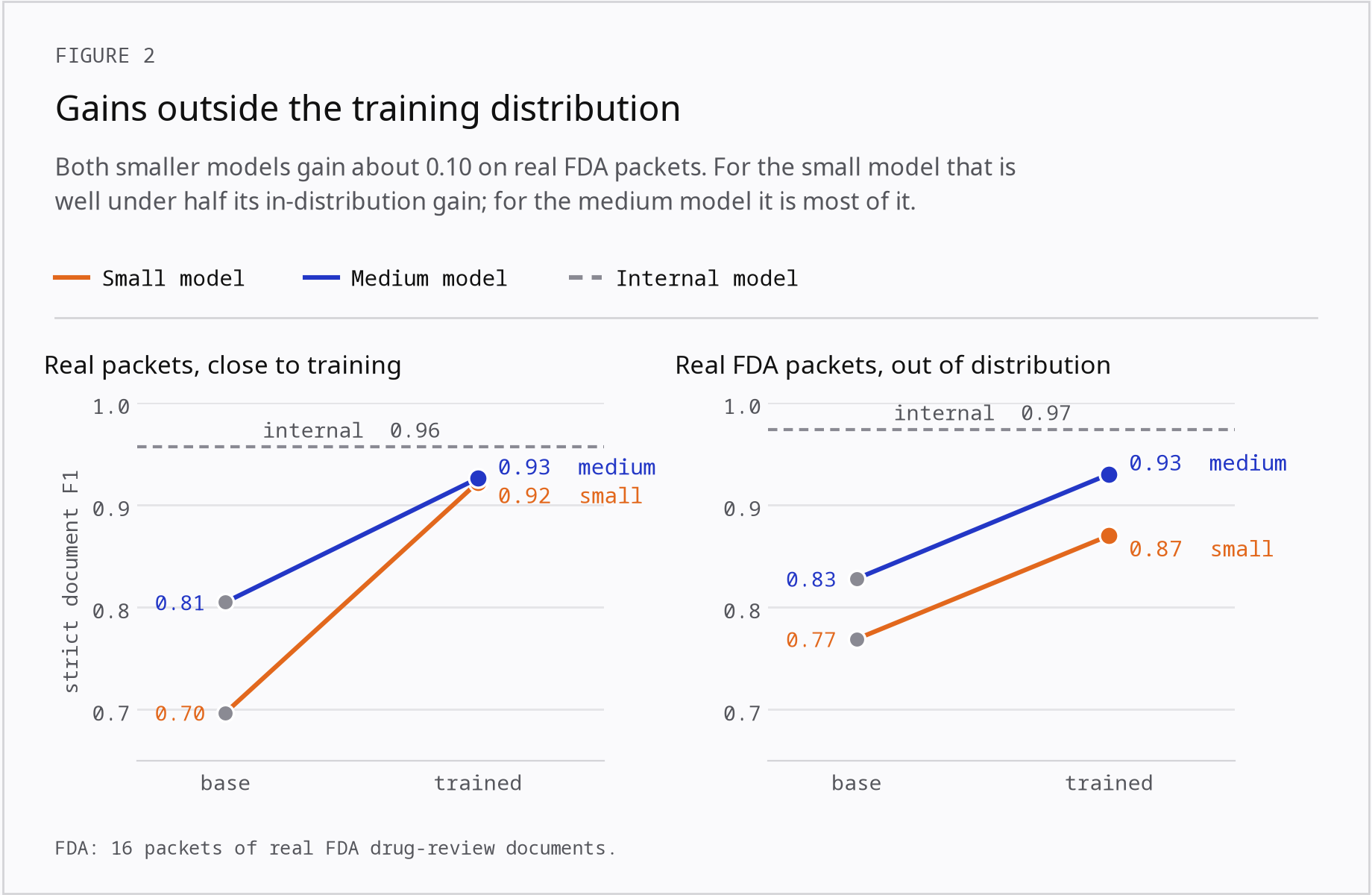
Custom conventions are where small models still lag. On PoliTax the medium model improves from 0.53 to 0.61 with training, but stays well short of the internal model’s 0.78.
Using it in the API
Send the packet to /segment with a page-level document-boundary schema. Add a prompt to set your own definition of a document:
import json
import time
import requests

headers = {"X-API-Key": "YOUR_API_KEY"}

schema = {
    "segmentation_strategy": "document_boundary",
    "granularity": "page",
    "prompt": "Each IRS form, schedule and supporting statement is its own document.",
}

response = requests.post(
    "https://www.datalab.to/api/v1/segment",
    headers=headers,
    files={"file": open("tax_filing.pdf", "rb")},
    data={"segmentation_schema": json.dumps(schema)},
)
check_url = response.json()["request_check_url"]

while True:
    result = requests.get(check_url, headers=headers).json()
    if result["status"] == "complete":
        break
    time.sleep(2)

for segment in result["segmentation_results"]["segments"]:
    print(segment["name"], segment["pages"], segment["confidence"])
Each segment comes back with a name, its pages (0-indexed) and a confidence. Leave out prompt to split on the default rules. See the segment API reference for the full request and response shape.
Pricing
Page-level segmentation stays at $0.50 per 1,000 pages, billed on its own with no parse required. Nothing changes on your side.
Splitting loan files, tax filings, medical records or discovery productions? Try it in the playground. And if your documents follow a convention that’s hard to describe, we’d love to hear about it: [email protected].