# Indra OCR: a 1M-parameter OCR model that reads 49 pages per second on CPU
> Indra OCR reads 49 pages per second on CPU, ~15x faster than Tesseract and PaddleOCR's PP-OCR text models, and more accurate on OmniParseBench text.
- Canonical: https://www.datalab.to/blog/indra-ocr
- Published: 2026-10-13
- Authors: Vik Paruchuri
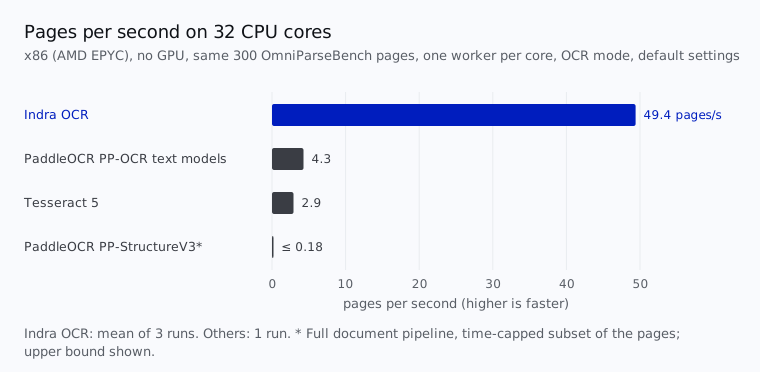
Today we're releasing **Indra OCR**, an OCR package built around a 1M-parameter recognition model. It reads 49 pages per second on 32 CPU cores, 11-17x faster than Tesseract and PaddleOCR's PP-OCR text models. Single page latency is ~230 ms. And it beats both of them on [OmniParseBench](/blog/omni-parse-bench) text benchmark.
It isn't only text. Indra OCR gives you the full layout: a bounding box for every line and every layout block, block labels (headings, lists, tables, captions and more) and reading order, as markdown or JSON.
fig. 1 - Pages per second on 32 CPU cores.
## Layout, boxes and clean markdown
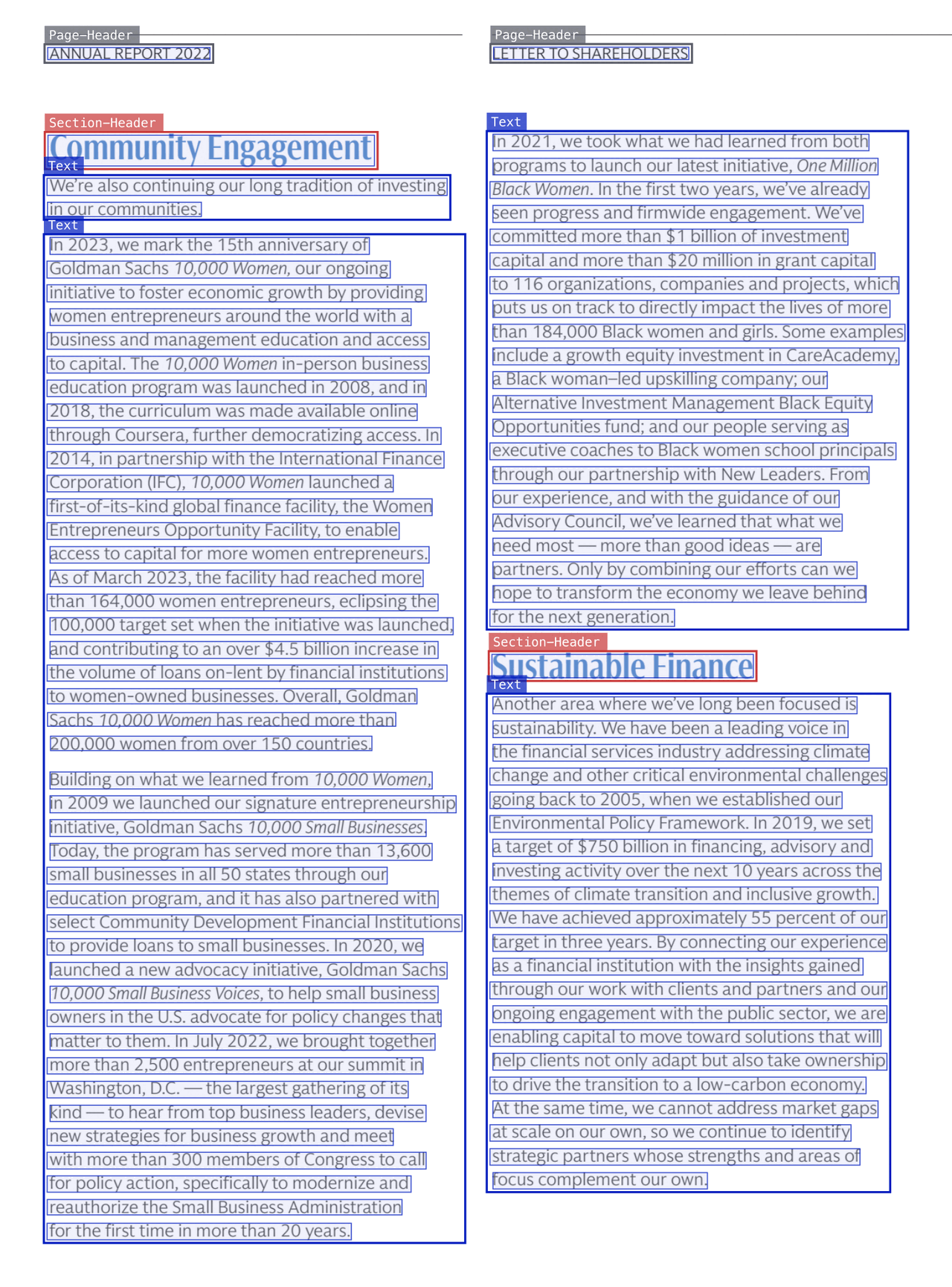
Indra OCR gives you more than text. Every line gets a bounding box, and every layout block gets a box, a label (text, section header, list, table, caption, footnote, form, table of contents, page header or page footer) and its place in the reading order. Pages turned upside down or sideways are turned upright first.
fig. 2 - Real Indra OCR output: every layout block labeled and boxed, every line boxed (thin), in reading order.
The markdown is clean: headings as `#`, paragraphs, lists, and tables as HTML, with page headers and footers left out by default (`--keep-furniture` keeps them). The JSON output has all of it with boxes: each line's box, text and confidence, the layout blocks in reading order, where each page's text came from (the PDF's text layer, OCR or both), and per-page timings. There are more real outputs in the [examples gallery](https://github.com/datalab-to/indra/blob/main/EXAMPLES.md).
fig. 3 - A table from a digital PDF, and the start of Indra OCR's markdown for it below.
```markdown
...
Table 1: Background data for the 75-year old study participants (n = 154).
Atrial fibrillation
No atrial fibriallation
Chi-square/df/p or t/d.f/p
Gender (male/female)
34 (31.8%)/12 (25.5%)
73 (68.2%)/35 (74.5%)
0.608/1/0.44
BMI (kg/m2)
25.3 ± 3.7
25.4 ± 3.2
-0.176/145/0.86
Waist (cm)
93.5 ± 11.7
91.6 ± 10.9
0.936/151/0.35
SBP (mmHg)
143 ± 21
147 ± 16
-1.169/152/0.24
DBP (mmHg)
82 ± 10
81 ± 9
1.069/152/0.29
...
```
## Why a small model?
For many digital and scanned documents, speed is more important than accuracy. Getting "good enough" text enables workflows like classification and segmentation. Many people running these workflows can only run on CPU (GPUs are expensive). Current OCR engines are slow and inaccurate in this case. Since it's 1M parameters and can run with extremely high throughput, Indra OCR unlocks entirely new ways of working with documents.
## Results
We scored every engine on [OmniParseBench](https://github.com/datalab-to/omni_parse_bench), our new benchmark of 16,288 pass/fail tests on 2,937 pages. Every engine ran on x86 with 4 vCPUs, one page at a time, on the same pages and scorer, with its default settings.
| engine | headline | text | tables | layout | median ms / page |
| ----------------------------------------------------------- | -------: | -------: | -------: | ----------: | ---------------: |
| **Indra OCR** (default: text layer + OCR) | 62.1 | 41.3 | **56.4** | **88.6** | **228** |
| Indra OCR (OCR only) | 57.5 | 33.5 | 50.9 | 88.2 | 303 |
| Indra OCR `--math` (opt-in) | **66.8** | **57.5** | 54.8 | 88.1 | ~360† |
| PaddleOCR PP-StructureV3\* | 58.4 | 55.6 | 47.8 | 71.7 | 40,958 |
| PaddleOCR PP-OCR text models (PP-OCRv6 small, via RapidOCR) | none | 35.8 | 0.0 | unsupported | 2,685 |
| Tesseract 5 | none | 19.3 | 0.0 | unsupported | 5,496 |
\* PP-StructureV3 is PaddleOCR's full document pipeline. One of its shards stalled on its first page, so its row leaves out 19 pages. † The `--math` latency is from a separate x86 run (AMD EPYC Genoa, 4 cores), where the default mode took 208 ms.
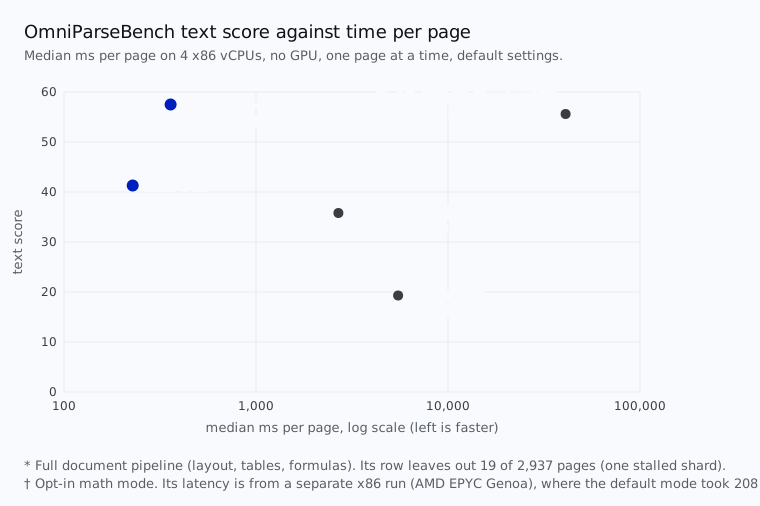
fig. 4 - OmniParseBench text score against median time per page.
A few things stand out:
- **Against the OCR engines, Indra OCR wins on both axes.** In its default mode, its text score is 41.3, against 35.8 for PaddleOCR's PP-OCR text models and 19.3 for Tesseract, at 12x and 24x their speed. Those engines output lines, not tables or layout, so they don't get a headline score. With the text layer turned off, Indra OCR still beats Tesseract by a wide margin and lands just behind PP-OCR on text (33.5 vs 35.8), at 303 ms per page.
- **Against a full document pipeline, it wins the headline.** PaddleOCR's PP-StructureV3 adds layout, tables and formulas on top of its OCR. Indra OCR beats it on the headline (62.1 vs 58.4), on tables and on layout, at about 1/180 of its time per page. In Indra OCR's default mode, PP-StructureV3 reads text better (55.6 vs 41.3). With `--math`, Indra OCR passes it on text too (57.5 vs 55.6) and leads on every score.
- **Digital PDFs are faster.** When a PDF has a usable text layer, Indra OCR reads the layer instead of running OCR. In our throughput run, those pages took a median of 130 ms each, against 304 ms for pages that needed OCR (one single-threaded worker per page).
Every engine ran with its default settings. Faster settings exist, and we didn't score their accuracy: Tesseract with the `eng` model and 1 thread takes 3.4 s a page, and PP-StructureV3 with its optional modules off and its mobile OCR models takes 10.5 s. Indra OCR is still 15-45x faster per page. The Tesseract row is our run (Tesseract 5, Latin model). You can reproduce the Indra OCR rows with `bench/opb_indra.py` in the repo.
## Throughput
The CLI and `indra_ocr.convert_many` run one single-threaded worker process per core, one page per task, so even one long PDF uses every core. Here is how that compares, in pages per second:
| engine | 4 cores | 8 cores | 16 cores | 32 cores |
| ----------------------------------------------------------- | ------: | -------: | -------: | -------: |
| **Indra OCR** | **7.3** | **14.2** | **27.2** | **49.4** |
| PaddleOCR PP-OCR text models (PP-OCRv6 small, via RapidOCR) | 0.65 | 1.24 | 2.42 | 4.28 |
| Tesseract 5 | 0.78 | 1.37 | 2.27 | 2.92 |
| PaddleOCR PP-StructureV3\* | ≤ 0.022 | ≤ 0.044 | ≤ 0.089 | ≤ 0.18 |
Every engine ran on the same x86 machine (AMD EPYC, no GPU) on the same 300 OmniParseBench pages, with one single-threaded worker per core, OCR mode and default settings. Indra OCR is the mean of 3 runs. At 32 cores, Indra OCR is 11.5x PaddleOCR's PP-OCR text models, 16.9x Tesseract and about 280x PP-StructureV3 (against its upper bound).
\* PP-StructureV3 ran a time-capped subset of the pages, so its numbers are upper bounds.
Model loading isn't in these numbers. A short 300-page job through `convert_many`, model loading included, runs at 37.7 pages per second on 32 cores.
## Math
Math is off by default. Turn on `--math` and a small classifier finds the lines that hold math, and a second recognizer writes them as text with inline LaTeX. On OmniParseBench, the headline goes from 62.1 to 66.8 and text from 41.4 to 57.5, so Indra OCR leads PaddleOCR's PP-StructureV3 on every score. Tables go down slightly (56.4 to 54.8), because some numbers in table cells get read as math.
| mode | headline | text | tables | layout | math tests |
| ----------------------- | -------: | -------: | -----: | -----: | ---------: |
| Indra OCR (default) | 62.1 | 41.4 | 56.4 | 88.5 | 14.3 |
| Indra OCR with `--math` | **66.8** | **57.5** | 54.8 | 88.1 | **56.5** |
Both rows come from one run setup on all 2,937 pages. The default row matches the table above within 0.1. "Math tests" are the 3,252 OmniParseBench tests that check LaTeX.
On x86 (AMD EPYC Genoa), a page takes ~360 ms instead of ~210 ms one at a time on 4 cores, and throughput is about 30-35% lower, ~30 pages per second on 32 cores. That's why it's opt-in. The math models download only when you turn it on.
## Quickstart
```bash
pip install indra-ocr
indra-ocr paper.pdf # markdown to stdout
indra-ocr *.pdf --out results/ # one .md per file, all cores
indra-ocr scan.png --format json # lines, boxes, layout blocks
```
Or from Python:
```python
import indra_ocr
conv = indra_ocr.load()
for i, page in conv.convert("paper.pdf"):
print(page.markdown)
```
The first run downloads the models from Hugging Face. There's also a local viewer, `indra-ocr-viewer`, that draws the boxes and the reading order over each page.
## Scripts
- **OCR (scans and images):** Latin (about 50 languages), Cyrillic, Greek, Devanagari, Bengali, and Chinese, simplified and traditional.
- **Digital PDFs: any script.** Through the text layer, Indra OCR handles text in any script. We checked it on pages from 75 language families, including Arabic, Hebrew, Thai, Khmer, Georgian, the Indic scripts, Japanese and Korean, and right-to-left lines keep their order.
## Limitations
Indra OCR is small and fast, and that has a cost:
- **Complex tables.** Simple tables come out clean, but tables with multi-level headers, merged cells or no ruling lines often lose structure. Its OmniParseBench table score is 56.4.
- **Handwriting.** It doesn't read handwriting yet (OmniParseBench handwriting tests: about 8%).
- **Scripts.** On scans and images, it OCRs Latin, Cyrillic, Greek, Devanagari, Bengali and Chinese only. Arabic, Hebrew, Thai, Japanese kana, Korean Hangul and other scripts are read only from a digital PDF's text layer. Vertical text, like traditional Chinese newspapers, isn't supported.
- **Math.** Math comes out as plain text unless you turn on `--math`, and old scanned math is still hard.
If your pages are mostly clean print in the scripts above, it should do very well. If they're handwritten, badly degraded or full of complex tables, it isn't the right tool.
## Try it
- Code: [github.com/datalab-to/indra](https://github.com/datalab-to/indra)
- Models: [huggingface.co/datalab-to/indra-ocr](https://huggingface.co/datalab-to/indra-ocr)
- Benchmark: [OmniParseBench](/blog/omni-parse-bench)
We'd love to hear what you run it on, and where it breaks.