
Today we’re releasing form field detection on the Datalab API. POST /api/v1/form-fields takes a PDF or an image and returns every place on each page where a person is meant to write, tick, or sign. Each field comes back with a type, a bounding box, and the printed label that tells a person what goes there. The endpoint reads the page image, so a scan or a flat PDF works the same way as a fillable one.
Here it is on three public forms. Hover over a box to find its row, or switch to JSON to see the page as the API returns it:
- Text 32
- Checkbox / radio 44
- Date 2
- Name / contact 4
- Signature / initials 1
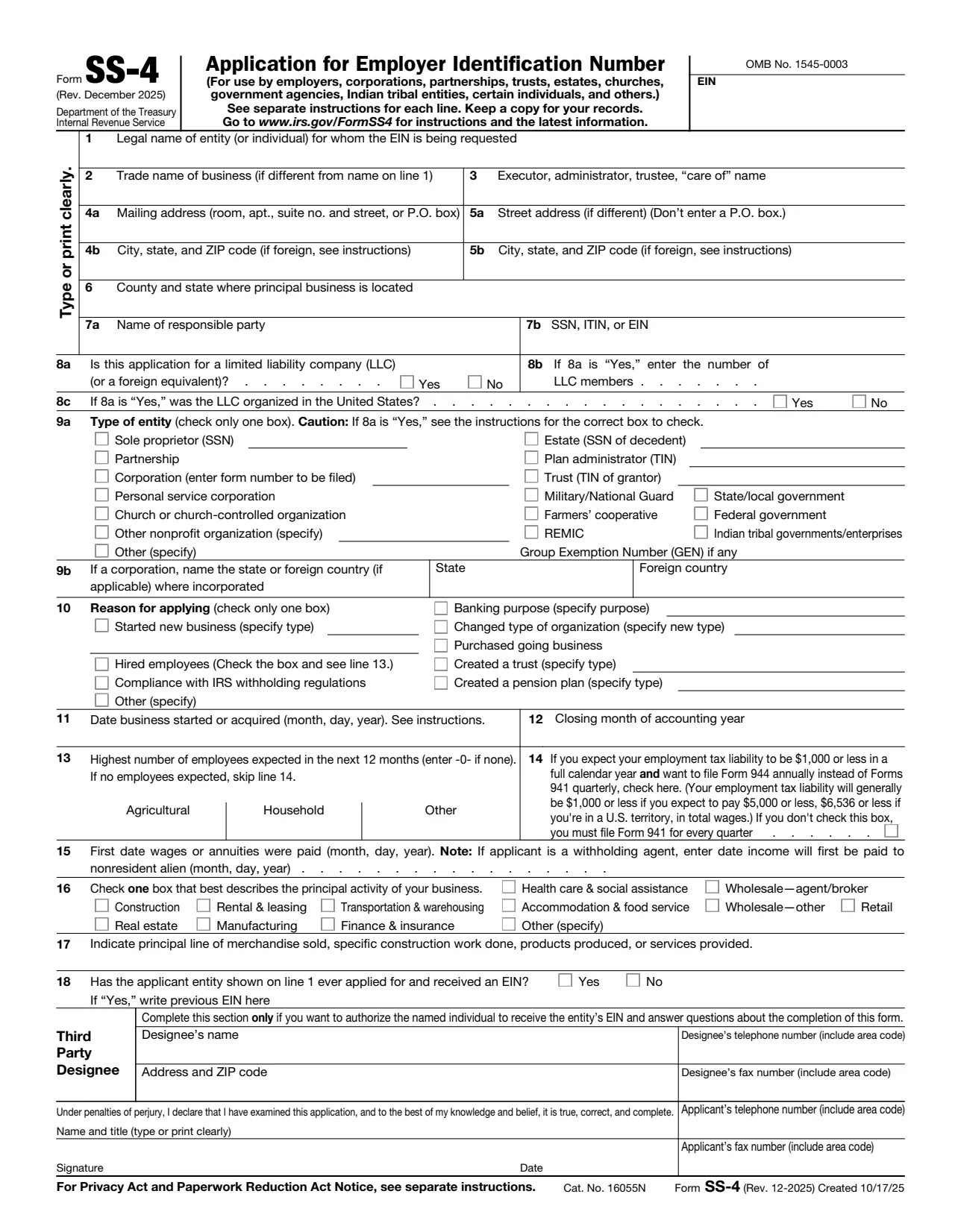
Source: IRS · output: POST /api/v1/form-fields,
no post-processing
Why forms are hard to automate
A fillable PDF stores its fields, but the names are often meaningless to a person. The 2025 Form 1040 names its fields like topmostSubform[0].Page1[0].f1_14[0]. And many forms that reach a pipeline aren’t fillable at all: they’re scans, PDFs exported from Word, or fillable PDFs that someone printed, signed, and scanned back.
Even when a form is fillable, its author decides which blanks become fields. The IRS Form W-7 has no fillable field for either of its signature lines or for the dates beside them.
So the blanks have to be found on the page, and they come in many shapes. The 1913 Form 1040 uses dotted leader lines and splits every amount into dollar and cent columns. The DS-82 asks yes-or-no questions with pairs of boxes. Tax forms print a box for each digit of a Social Security number. Instruction pages have no fields at all, and a detector has to return nothing for them.
What you get back
Every field has one of 12 types:
| Type | Used for |
|---|---|
text | Any written answer that doesn’t fit a more specific type |
checkbox, radio | Tick boxes, and options where only one can be chosen |
date | Dates, including a date split into month, day, and year boxes |
signature, initials | Places to sign or initial |
name, firstName, lastName | Names of people |
email, company, title | Contact details, company names, and job titles |
The model picks the type from the printed label and the layout around the blank. The second line of the W-9 asks for a business name and comes back as company. The blank after “Date” in the signature row comes back as date.
With the printed label on each field, you don’t have to match a box to nearby text yourself. Fields are listed in reading order. The model is trained to return only empty fields.
Accuracy and speed
In our tests, form field detection finds 87% of form fields, and the median page takes 1.1 seconds. Pages with more fields take longer, because the model writes each field out in turn.
Using it
The endpoint works like our other APIs: submit a file, then poll request_check_url until the status is complete.
import os, time, requests

headers = {"X-Api-Key": os.environ["DATALAB_API_KEY"]}

with open("fw9.pdf", "rb") as f:
    resp = requests.post(
        "https://www.datalab.to/api/v1/form-fields",
        headers=headers,
        files={"file": ("fw9.pdf", f, "application/pdf")},
    ).json()

while True:
    result = requests.get(resp["request_check_url"], headers=headers).json()
    if result["status"] == "complete":
        break
    time.sleep(2)

for page in result["pages"]:
    for field in page["fields"]:
        print(page["page"], field["field_type"], field["label"], field["bbox"])
This is part of the result for page 1 of the W-9, as the model returned it:
{
  "page": 0,
  "fields": [
    {"field_type": "text", "bbox": [0.094, 0.143, 0.941, 0.166], "label": "Name of entity/individual. An entry is required. (For a sole proprietor or d"},
    {"field_type": "company", "bbox": [0.094, 0.176, 0.941, 0.197], "label": "Business name/disregarded entity name, if different from above."},
    {"field_type": "checkbox", "bbox": [0.118, 0.226, 0.131, 0.236], "label": "Individual/sole proprietor"},
    ...
    {"field_type": "signature", "bbox": [0.194, 0.731, 0.623, 0.757], "label": "Signature of U.S. person"},
    {"field_type": "date", "bbox": [0.658, 0.731, 0.941, 0.757], "label": "Date"}
  ],
  "error": ""
}
bbox is [x0, y0, x1, y1] as fractions of the page width and height, with the origin at the top left. To place a field on a PDF page, multiply by the page size in points and flip the y axis, because PDF coordinates start at the bottom left:
from pypdf import PdfReader

reader = PdfReader("fw9.pdf")
for page in result["pages"]:
    box = reader.pages[page["page"]].mediabox
    width, height = float(box.width), float(box.height)
    for field in page["fields"]:
        x0, y0, x1, y1 = field["bbox"]
        rect = (x0 * width, (1 - y1) * height, x1 * width, (1 - y0) * height)
        print(field["field_type"], field["label"], rect)
You can send a file_url instead of uploading the file, limit the pages with page_range (like 0,5-10) or max_pages, and pass a webhook_url to get called when the request finishes. Set processing_location=eu to keep page images in the EU. The endpoint takes PDFs, images, and the other document formats we accept, but not spreadsheets.
If the model can’t read a page, that page comes back with an error message and no fields, and you aren’t charged for it. The request fails only if every page fails.
Where it fits
- Signature workflows: find the signature, initials, and date fields on an uploaded contract or onboarding packet, and place signing tags there automatically.
- Making flat PDFs fillable: write a form field at each box, using the type to pick a text field, a checkbox, or a signature field.
- Digitizing paper forms: build a web form from a paper one, with the printed labels as the questions.
- Before form filling: our
/fillendpoint fills a form from data you already have. Field detection tells you what a form asks for, so you can collect those values first. - Finding blanks a person missed: run it on a submitted form to list what was left blank.
Pricing
Form field detection costs $3 per 1,000 pages.
If you have forms that trip it up, send a few to [email protected].