# Data extraction vs parsing: Which to use?
> Choose parsing for document context and extraction for specific fields. Extract, validate, and evaluate financial data with a JSON schema and the Datalab API.
- Canonical: https://www.datalab.to/blog/data-extraction-vs-parsing
- Published: 2026-11-02
- Authors: Casey Bates
A manager and an analyst need different things from the same NVIDIA financial report. The manager wants an agent to read the report and answer questions. The analyst needs four values in a database to track revenue and earnings over time.
Document parsing converts a document into a machine-readable representation. Data extraction retrieves the fields an application needs. Both can return JSON (JavaScript Object Notation), so the file format alone doesn't tell you which one to use.
We'll use [NVIDIA's second-quarter fiscal 2027 financial results](https://nvidianews.nvidia.com/news/nvidia-announces-financial-results-for-second-quarter-fiscal-2027) to work through both. The [tutorials repository](https://github.com/datalab-to/tutorials/tree/main/nvidia-extraction-sample) has the source document, extraction schemas, and ground-truth values.
## When to use parsing, extraction, or both
Parsing converts a Portable Document Format (PDF) file, Word document, spreadsheet, or image into Markdown, HTML (Hypertext Markup Language), JSON, or Chunks. The output represents the document's content and structure. In Datalab, this operation is called Convert.
Extraction returns values for the fields named in an Extraction Schema. You define the field names, types, and descriptions in JSON Schema format. In Datalab, this operation is called Extract.
The manager needs the report's prose and tables so the agent can answer questions that may change. The analyst needs selected values with consistent names and units. The application can validate those values before storing them in a database.
| Consideration | Document parsing | Data extraction |
| ---------------- | ---------------------------------------------------------------------- | ----------------------------------------------------------------- |
| What you need | Document content for reading, search, summaries, or changing questions | Selected fields for a database, calculation, or business workflow |
| Output | Markdown, HTML, JSON, or Chunks representing the document | JSON values for the fields in an Extraction Schema |
| What you define | Output format and conversion options | Field names, types, and descriptions |
| What to validate | Content, reading order, and table structure | Each value's meaning, period, units, and source evidence |
| NVIDIA example | The financial report as Markdown for an agent to read | Quarter end date, revenue, and earnings per share |
An invoice processing application can extract the invoice number, date, and amount, then route discrepancies for review. A dashboard with a document question-answering feature needs both: extraction supplies the metrics, and parsing supplies the surrounding content.
## Convert a PDF to Markdown
The [Datalab Convert API](https://documentation.datalab.to/docs/recipes/conversion/conversion-api-overview) can return the report as Markdown. Save the report as `NVIDIA-financial-results.pdf` beside your script. With the Python SDK (Software Development Kit) installed and `DATALAB_API_KEY` set in your environment:
```python
from datalab_sdk import DatalabClient
client = DatalabClient()
result = client.convert("NVIDIA-financial-results.pdf")
if not result.success:
raise RuntimeError(result.error or "Document processing failed")
print(result.markdown)
```
The Markdown includes the report's heading, financial tables, and commentary. An agent can read that content to answer questions about the report. The [Quickstart guide](https://documentation.datalab.to/docs/welcome/quickstart) covers SDK setup.
## Define the fields to extract
The analyst needs four fields for the current reported quarter:
- Quarter end date.
- Revenue in millions of US dollars (USD).
- Diluted earnings per share under Generally Accepted Accounting Principles (GAAP).
- Non-GAAP diluted earnings per share.
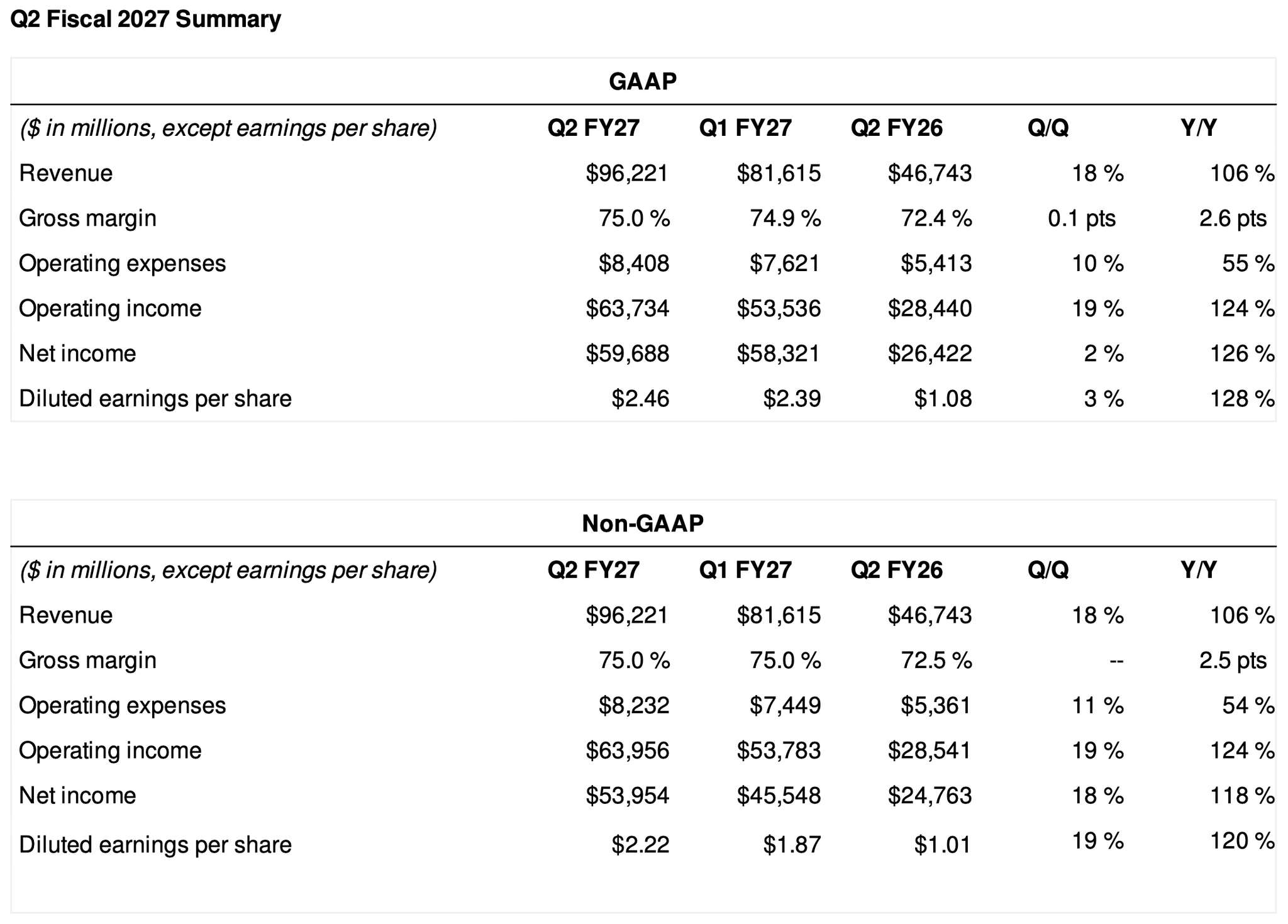 _The summary tables on page 1 use the same row labels for GAAP and non-GAAP results. Neither summary table states the quarter end date. Source: [NVIDIA](https://nvidianews.nvidia.com/news/nvidia-announces-financial-results-for-second-quarter-fiscal-2027)._
The report has several plausible answers to a vague request for "earnings per share." The Extraction Schema needs to distinguish GAAP from non-GAAP, diluted from basic, and the current quarter from other periods. Revenue also needs a unit: the headline rounds to billions, while the table gives an exact amount in millions.
Save this Extraction Schema as `schema.json`:
```json
{
"type": "object",
"properties": {
"quarter_end": {
"type": "string",
"format": "date",
"description": "End date of the current reported fiscal quarter, YYYY-MM-DD. Not the publication or dividend date."
},
"quarter_revenue_usd_millions": {
"type": "number",
"description": "Current quarter revenue in USD millions from the financial table. Use the three-month period and exact table amount, not rounded headline billions."
},
"quarter_gaap_diluted_eps_usd": {
"type": "number",
"description": "Current quarter GAAP diluted earnings per share in USD per share. Not basic, non-GAAP or year-to-date EPS."
},
"quarter_non_gaap_diluted_eps_usd": {
"type": "number",
"description": "Current quarter non-GAAP diluted earnings per share in USD per share as presented in this release."
}
},
"required": ["quarter_end", "quarter_revenue_usd_millions", "quarter_gaap_diluted_eps_usd", "quarter_non_gaap_diluted_eps_usd"],
"additionalProperties": false
}
```
The field names include the period, accounting basis, and units. The descriptions tell the model which nearby values to exclude. `required` names the fields the object must contain, and `additionalProperties: false` disallows undeclared properties in that object. Neither constraint proves that an extracted value is correct.
Here, earnings per share (EPS) fields use numbers so the application can calculate with them. The date uses a string with a date format. Keep the Extraction Schema as simple as the data permits; these four scalar fields don't need nested objects.
The [extraction documentation](https://documentation.datalab.to/docs/recipes/structured-extraction/api-overview) has more examples and a [schema generation option](https://documentation.datalab.to/docs/recipes/structured-extraction/api-overview#auto-generate-schemas). Review generated field descriptions against the application's requirements before using them.
## Extract the values and inspect the citations
Read `schema.json` and submit it with the report. Set `extraction_mode="balanced"` to request field metadata and verification. The separate `mode` option controls conversion; here we set it to `"accurate"`.
```python
import json
from pathlib import Path
from datalab_sdk import DatalabClient, ExtractOptions
client = DatalabClient()
options = ExtractOptions(
page_schema=Path("schema.json").read_text(encoding="utf-8"),
extraction_mode="balanced",
mode="accurate",
)
result = client.extract("NVIDIA-financial-results.pdf", options=options)
if not result.success:
raise RuntimeError(result.error or "Document processing failed")
extracted = json.loads(result.extraction_schema_json)
print({field: extracted[field] for field in json.loads(options.page_schema)["properties"]})
Path("output.json").write_text(json.dumps(extracted, indent=2), encoding="utf-8")
```
In the sample run, the requested values were:
```json
{
"quarter_end": "2026-07-26",
"quarter_revenue_usd_millions": 96221,
"quarter_gaap_diluted_eps_usd": 2.46,
"quarter_non_gaap_diluted_eps_usd": 2.22
}
```
The saved output also has citation and metadata keys. Those keys are API annotations added alongside the requested values; select your declared fields when validating the business object against the Extraction Schema or writing it to a database.
The quarter end date isn't in either summary table. The model found it in the report's opening paragraph. This excerpt from the saved response shows the supporting Block and verification result:
```json
{
"quarter_end": "2026-07-26",
"quarter_end_citations": ["/page/0/Text/3"],
"quarter_end_meta": {
"extraction_status": "EXTRACTED",
"reasoning": null,
"citations": ["/page/0/Text/3"],
"verification": {
"status": "PASS",
"feedback": "The reported quarter ended July 26, 2026, in /page/0/Text/3 supports the extraction. Conclusion: the value at /page/0/Text/3 agrees with the extraction."
}
}
}
```
The citation `/page/0/Text/3` identifies a text Block on the first page. Block identifiers use zero-based page and Block indices. The screenshot shows that Block with the date highlighted:
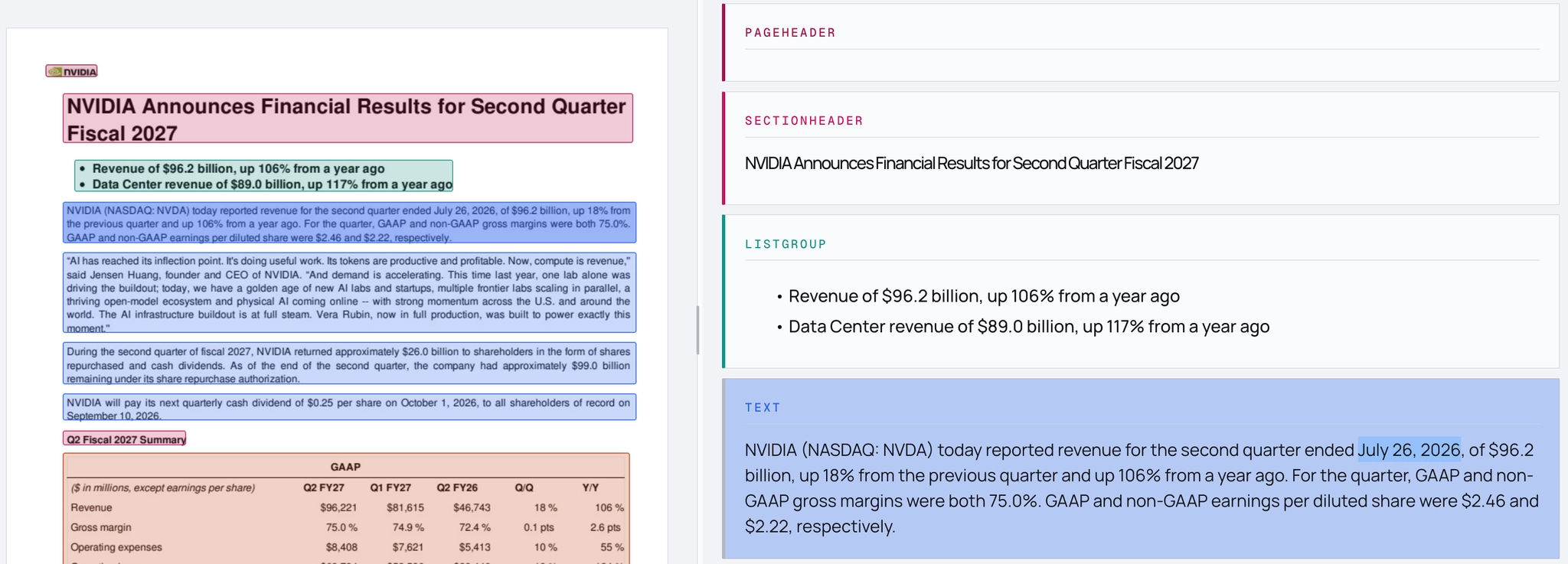 _The source page and converted Blocks in Datalab's document viewer. Layout boxes and the date highlight are Datalab output._
In [balanced and accurate Extraction Modes](https://documentation.datalab.to/docs/recipes/structured-extraction/balanced-mode), `EXTRACTED` means the value was found in or derived from the document. `NOT_RESOLVABLE` means the document doesn't contain or imply the requested value, and the value is returned as `null`.
A citation locates supporting content. Verification checks the extracted value against the document and field description. A missing verification result or a status other than `PASS` needs review in a workflow that requires verification. A passing result still needs to match the application's intended meaning.
## An ambiguous description can pass verification
Suppose the analyst wants non-GAAP diluted earnings per share, and we give the model this Extraction Schema:
```json
{
"type": "object",
"properties": {
"eps": {
"type": "number",
"description": "Diluted earnings per share for Q2 FY27 from the financial summary tables, in USD per share."
}
},
"required": ["eps"],
"additionalProperties": false
}
```
The description specifies the second quarter of fiscal year 2027, but it doesn't specify the accounting basis. In the sample run, extraction returned the GAAP value of $2.46 and verification passed. The feedback explicitly identified it as GAAP:
```json
{
"eps": 2.46,
"eps_citations": ["/page/0/Text/3", "/page/0/Table/8"],
"eps_meta": {
"extraction_status": "EXTRACTED",
"reasoning": null,
"citations": ["/page/0/Text/3", "/page/0/Table/8"],
"verification": {
"status": "PASS",
"feedback": "The Q2 FY27 GAAP diluted earnings per share is supported by /page/0/Text/3 and /page/0/Table/8. Conclusion: the value at /page/0/Text/3 and /page/0/Table/8 agrees with the extraction."
}
}
}
```
The value is supported by the document and fits the description we supplied. It fails the analyst's requirement because we left "non-GAAP" out of the description.
Changing the description to "Non-GAAP diluted earnings per share for Q2 FY27 from the financial summary tables, in USD per share" returned $2.22 in the sample run. The verification feedback cited the non-GAAP table at `/page/0/Table/9` and the opening paragraph.
Use the descriptive field name `quarter_non_gaap_diluted_eps_usd` as well. A reviewer can identify its accounting basis and units without having to infer what `eps` means.
## Evaluate extraction against ground truth
To measure whether extraction meets the analyst's requirement, compare the values against independently checked answers. [Omni Extract Bench](https://github.com/datalab-to/omni_extract_bench) has a deterministic scorer and a prediction harness for this.
The sample compares two Extraction Schemas on the same document. Both ask for the four fields above. The vague version calls the non-GAAP field `diluted_eps_usd` and omits "non-GAAP" from its description. The precise version uses `quarter_non_gaap_diluted_eps_usd` and the description in `schema.json`.
Use this folder structure for the following scripts:
```text
eval/
├── NVIDIA-financial-results.pdf
├── predict.py
├── score.py
├── schemas/
│ ├── nvidia_q2_fy27_vague.json
│ └── nvidia_q2_fy27.json
└── gold/
├── nvidia_q2_fy27_vague.json
└── nvidia_q2_fy27.json
```
Save `schema.json` as `schemas/nvidia_q2_fy27.json`. For the vague version, replace the non-GAAP field's name with `diluted_eps_usd` in both `properties` and `required`, and use the ambiguous description above. Keep the other three fields unchanged.
Save these expected values as `gold/nvidia_q2_fy27.json`:
```json
{
"quarter_end": "2026-07-26",
"quarter_revenue_usd_millions": 96221,
"quarter_gaap_diluted_eps_usd": 2.46,
"quarter_non_gaap_diluted_eps_usd": 2.22
}
```
For `gold/nvidia_q2_fy27_vague.json`, use the same values and rename `quarter_non_gaap_diluted_eps_usd` to `diluted_eps_usd`. Its expected value stays `2.22`, because that is the analyst's requirement. The scorer pairs object fields by key, so each ground-truth file must use its Extraction Schema's field names.
With the `omni-extract-bench[harness]` package installed, save this as `predict.py`. It submits both Extraction Schemas and saves the predictions:
```python
import json
from pathlib import Path
from omni_extract_bench import harness
from omni_extract_bench.harness import contract
root = Path(__file__).resolve().parent
predictions = root / "predictions"
predictions.mkdir(exist_ok=True)
system = harness.system("datalab", {"mode": "balanced"})
for doc_id in ("nvidia_q2_fy27_vague", "nvidia_q2_fy27"):
schema = json.loads((root / "schemas" / f"{doc_id}.json").read_text(encoding="utf-8"))
question = contract.Question(root / "NVIDIA-financial-results.pdf", schema)
record = harness.predict(system, question, timeout=1800)
if record["error"]:
raise RuntimeError(record["error"]["message"])
(predictions / f"{doc_id}.json").write_text(
json.dumps(record["output"], indent=2), encoding="utf-8"
)
```
The harness's `mode` option selects the Extraction Mode for its Datalab adapter. This differs from the SDK's separate `mode` and `extraction_mode` options.
Save this as `score.py` to score the saved predictions without another API call:
```python
import json
from pathlib import Path
from omni_extract_bench import score
root = Path(__file__).resolve().parent
for doc_id in ("nvidia_q2_fy27_vague", "nvidia_q2_fy27"):
schema = json.loads((root / "schemas" / f"{doc_id}.json").read_text(encoding="utf-8"))
gold = json.loads((root / "gold" / f"{doc_id}.json").read_text(encoding="utf-8"))
pred = json.loads((root / "predictions" / f"{doc_id}.json").read_text(encoding="utf-8"))
result = score(pred, gold, schema, verdicts=True)
for verdict in result["verdicts"]:
field = verdict.address[-1][1]
print(f"{doc_id}.{field}: {verdict.verdict} (gold={verdict.gold_raw}, pred={verdict.pred_raw})")
print(f"{doc_id}: accuracy={result['accuracy']:.2f}\n")
```
Run `python eval/predict.py`, then `python eval/score.py`.
In the sample run, the vague Extraction Schema returned the GAAP value for the field intended to hold non-GAAP earnings. Three fields matched, and the scorer labeled that field `misread`:
```text
nvidia_q2_fy27_vague.diluted_eps_usd: misread (gold=2.22, pred=2.46)
nvidia_q2_fy27_vague.quarter_end: matched (gold=2026-07-26, pred=2026-07-26)
nvidia_q2_fy27_vague.quarter_gaap_diluted_eps_usd: matched (gold=2.46, pred=2.46)
nvidia_q2_fy27_vague.quarter_revenue_usd_millions: matched (gold=96221, pred=96221)
nvidia_q2_fy27_vague: accuracy=0.75
```
The precise Extraction Schema returned all four expected values:
```text
nvidia_q2_fy27.quarter_end: matched (gold=2026-07-26, pred=2026-07-26)
nvidia_q2_fy27.quarter_gaap_diluted_eps_usd: matched (gold=2.46, pred=2.46)
nvidia_q2_fy27.quarter_non_gaap_diluted_eps_usd: matched (gold=2.22, pred=2.22)
nvidia_q2_fy27.quarter_revenue_usd_millions: matched (gold=96221, pred=96221)
nvidia_q2_fy27: accuracy=1.00
```
These are results for four fields in one document, not an estimate of accuracy across financial reports. Model output can vary between runs. The example shows how a ground-truth comparison can catch a mismatch that passed verification.
The [scoring specification](https://github.com/datalab-to/omni_extract_bench/blob/main/docs/METRIC_SPEC.md) defines the matching rules. Our [Omni Extract Bench post](/blog/omni-extract-bench) describes the broader benchmark, and the [dataset is on Hugging Face](https://huggingface.co/datasets/datalab-to/omni_extract_bench).
## Frequently asked questions
### What's the difference between parsing and data extraction?
Parsing represents a document's content in another format. Extraction returns selected values under field names defined in an Extraction Schema. Both can return JSON; parsing's JSON describes the document's structure, while extraction's JSON contains the requested fields and any API annotations.
### Do I need both?
Use both when your application needs selected values and the surrounding document content. For example, a dashboard can use extracted revenue fields for charts and converted text for questions about the report.
### Does optical character recognition count as parsing?
Optical character recognition (OCR) reads text from images. Document parsing also reconstructs content such as reading order and table structure. Datalab uses OCR as part of conversion.
### Does passing verification mean an extraction is correct?
A value can pass verification while failing the application's requirement if the field description is ambiguous. Check citations and verification metadata, and evaluate the requested fields against independently checked expected values.
### What do extraction evaluations measure?
They compare predicted values with ground truth. The results can expose incorrect values, missing fields, and descriptions that don't express the application's requirements.
To run the NVIDIA example, start with the document, Extraction Schemas, and ground-truth files in the [tutorials repository](https://github.com/datalab-to/tutorials/tree/main/nvidia-extraction-sample).
 [Casey Bates](https://www.linkedin.com/in/caseybates/) is the founder and CTO of ThinkFox AI, where he builds agentic AI tools and teaches teams to use them.