Talk to Sales

Benchmarks

View scores and output across OCR models spanning many document categories.

Want to run these evals on your own documents?

Talk to Sales
Page 1

ਐਕਸੈਸ ਕੰਟਰੋਲ ਕਿਵੇਂ ਲਗਾਉਣੇ ਹਨ

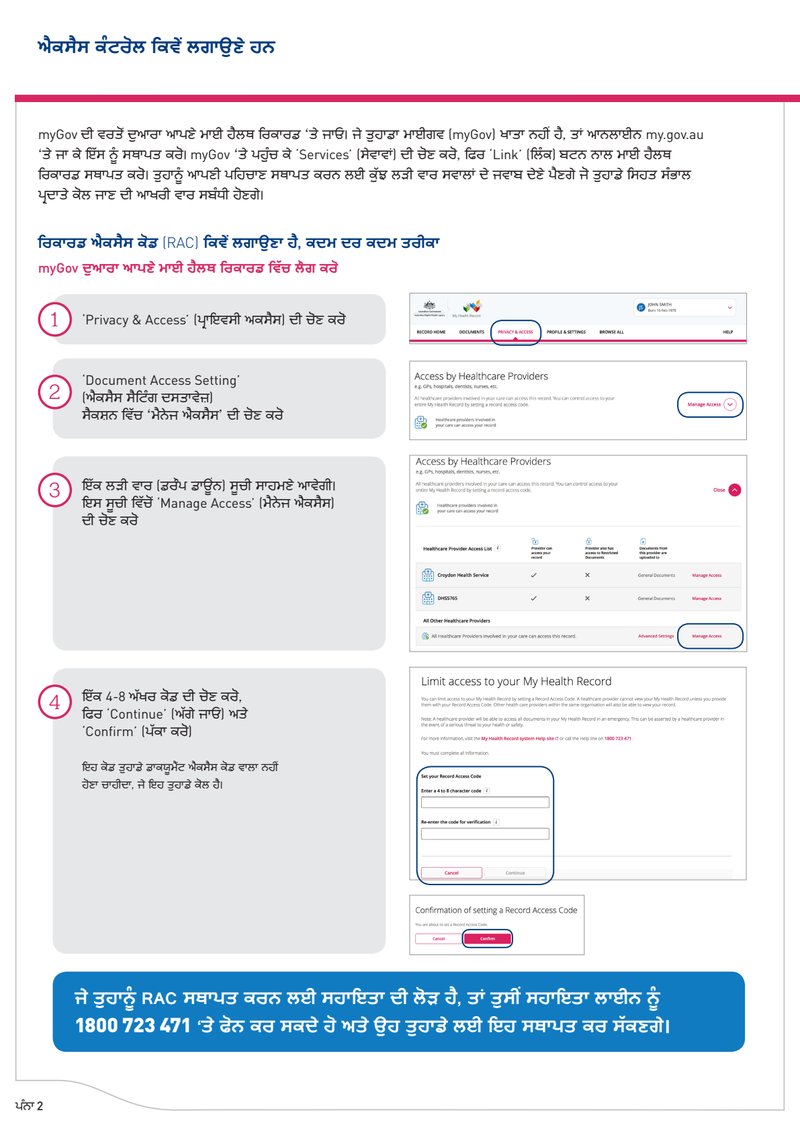
myGov ਦੀ ਵਰਤੋਂ ਦੁਆਰਾ ਆਪਣੇ ਮਾਈ ਹੈਲਥ ਰਿਕਾਰਡ ‘ਤੇ ਜਾਓ। ਜੇ ਤੁਹਾਡਾ ਮਾਈਗਵ (myGov) ਖਾਤਾ ਨਹੀਂ ਹੈ, ਤਾਂ ਆਨਲਾਈਨ my.gov.au ‘ਤੇ ਜਾ ਕੇ ਇੱਸ ਨੂੰ ਸਥਾਪਤ ਕਰੋ। myGov ‘ਤੇ ਪਹੁੰਚ ਕੇ 'Services' (ਸੇਵਾਵਾਂ) ਦੀ ਚੋਣ ਕਰੋ, ਫਿਰ ‘Link' (ਲਿੰਕ) ਬਟਨ ਨਾਲ ਮਾਈ ਹੈਲਥ ਰਿਕਾਰਡ ਸਥਾਪਤ ਕਰੋ। ਤੁਹਾਨੂੰ ਆਪਣੀ ਪਹਿਚਾਣ ਸਥਾਪਤ ਕਰਨ ਲਈ ਕੁੱਝ ਲੜੀ ਵਾਰ ਸਵਾਲਾਂ ਦੇ ਜਵਾਬ ਦੇਣੇ ਪੈਣਗੇ ਜੋ ਤੁਹਾਡੇ ਸਿਹਤ ਸੰਭਾਲ ਪ੍ਰਦਾਤੇ ਕੋਲ ਜਾਣ ਦੀ ਆਖਰੀ ਵਾਰ ਸਬੰਧੀ ਹੋਣਗੇ।

ਰਿਕਾਰਡ ਐਕਸੈਸ ਕੋਡ (RAC) ਕਿਵੇਂ ਲਗਾਉਣਾ ਹੈ, ਕਦਮ ਦਰ ਕਦਮ ਤਰੀਕਾ

myGov ਦੁਆਰਾ ਆਪਣੇ ਮਾਈ ਹੈਲਥ ਰਿਕਾਰਡ ਵਿੱਚ ਲੌਗ ਕਰੋ

1. 'Privacy & Access' (ਪ੍ਰਾਇਵੇਸੀ ਐਕਸੈਸ) ਦੀ ਚੋਣ ਕਰੋ

Screenshot of the My Health Record system navigation bar showing tabs. The 'PRIVACY & ACCESS' tab is highlighted.

2. 'Document Access Setting'
(ਐਕਸੈਸ ਸੈਟਿੰਗ ਦਸਤਾਵੇਜ਼)
ਸੈਕਸ਼ਨ ਵਿੱਚ ‘ਮੈਨੇਜ ਐਕਸੈਸ' ਦੀ ਚੋਣ ਕਰੋ

Screenshot of the 'Access by Healthcare Providers' section, showing text about controlling access via a record access code, and a 'Manage Access' button.

3. ਇੱਕ ਲੜੀ ਵਾਰ (ਡਰੌਪ ਡਾਊਨ) ਸੂਚੀ ਸਾਹਮਣੇ ਆਵੇਗੀ।
ਇਸ ਸੂਚੀ ਵਿੱਚੋਂ 'Manage Access' (ਮੈਨੇਜ ਐਕਸੈਸ)
ਦੀ ਚੋਣ ਕਰੋ

Screenshot showing detailed access settings for Healthcare Providers, including a list of providers (Croydon Health Service, DHS5765) and options for managing access and restricted documents. Below this, 'All Other Healthcare Providers' section shows 'Advanced Settings' and 'Manage Access'.

4. ਇੱਕ 4-8 ਅੱਖਰ ਕੋਡ ਦੀ ਚੋਣ ਕਰੋ,
ਫਿਰ 'Continue' (ਅੱਗੇ ਜਾਓ) ਅਤੇ
'Confirm' (ਪੱਕਾ ਕਰੋ)

ਇਹ ਕੋਡ ਤੁਹਾਡੇ ਡਾਕਯੂਮੈਂਟ ਐਕਸੈਸ ਕੋਡ ਵਾਲਾ ਨਹੀਂ
ਹੋਣਾ ਚਾਹੀਦਾ, ਜੇ ਇਹ ਤੁਹਾਡੇ ਕੋਲ ਹੈ।

Screenshot of the 'Limit access to your My Health Record' section. Text explains setting a Record Access Code. A form is shown to 'Set your Record Access Code' by entering and re-entering a 4 to 8 character code, with 'Cancel' and 'Continue' buttons.
Screenshot of the 'Confirmation of setting a Record Access Code' screen, showing 'Cancel' and 'Confirm' buttons.

ਜੇ ਤੁਹਾਨੂੰ RAC ਸਥਾਪਤ ਕਰਨ ਲਈ ਸਹਾਇਤਾ ਦੀ ਲੋੜ ਹੈ, ਤਾਂ ਤੁਸੀਂ ਸਹਾਇਤਾ ਲਾਈਨ ਨੂੰ
1800 723 471 ‘ਤੇ ਫੋਨ ਕਰ ਸਕਦੇ ਹੋ ਅਤੇ ਉਹ ਤੁਹਾਡੇ ਲਈ ਇਹ ਸਥਾਪਤ ਕਰ ਸੱਕਣਗੇ।

ਪੰਨਾ 2